0.
Introduction to GUIs and Windows Programming (Powerpoint, Adobe format,
2 slides/page format)
1.
Using the Visual Studio .NET IDE (Powerpoint, Adobe format, 2
slides/page)
2.
Win32 API Programming (Powerpoint, Adobe format, 2 slides/page)
3.
MFC, App/Windows Programming (Powerpoint, Adobe format, 2 slides/page)
4.
MFC, Document/View Programming (Powerpoint, Adobe format, 2 slides/page)
5.
The .NET Framework: C#, Classes, Windows Forms, Events, Delegates,
Handlers
6.
Timers, Animation, Images, Bitmaps, DateTime
7.
The Mouse and the Keyboard
8.
Windows Controls
9.
Text and Fonts
10.
Dialog Boxes, Text Boxes, List Boxes, Combo Boxes
11.
Menus and Printing
12.
File I/O
14a.
Windows Multimedia under .NET
13.
Graphics Units, Transformations, and the Clipboard
14.
Multithreading
15.
The Internet: Networking with Sockets
16.
World Wide Web, Web Applications, Web Forms
16A.Web
Applications, Web Forms, Continued
17.
ASP.NET Web Services and Web Clients
18.
Databases and ADO.NET
Old CS-360 Notes (Fall, 2007)
0.
Introduction to GUIs and Windows Programming (Powerpoint, Adobe format,
6 slides/page format)
1.
Using the Visual Studio .NET IDE (Powerpoint, Adobe format, 6
slides/page)
2.
Win32 API Programming (Powerpoint, Adobe format, 6 slides/page)
3.
MFC, App/Windows Programming (Powerpoint, Adobe format, 6 slides/page)
4.
MFC, Document/View Programming (Powerpoint, Adobe format, 6 slides/page)
5.
The .NET Framework: C#, Classes, Windows Forms, Events, Delegates,
Handlers
6.
Timers, Animation, Images, Bitmaps, DateTime
7.
The Mouse and the Keyboard
8.
Windows Controls
9.
Text and Fonts
10.
Dialog Boxes, Text Boxes, List Boxes, Combo Boxes
11.
Menus and Printing
12.
File I/O
13.
Graphics Units, Transformations, and the Clipboard
14a.
Windows Multimedia under .NET
14.
Multithreading
14b.
Custom Controls
15.
The Internet: Networking with Sockets
16.
World Wide Web, Web Applications, Web Forms
16A.Web
Applications, Web Forms, Continued
17.
ASP.NET Web Services and Web Clients
18.
Databases and ADO.NET
Old CS-360 Notes (Fall, 2005)
0.
Introduction to GUIs and Windows Programming (Powerpoint, Adobe format,
6 slides/page format)
1.
Using the Visual Studio .NET IDE (Powerpoint, Adobe format, 6
slides/page)
2.
Win32 API Programming (Powerpoint, Adobe format, 6 slides/page)
3.
MFC, App/Windows Programming (Powerpoint, Adobe format, 6 slides/page)
4.
MFC, Document/View Programming (Powerpoint, Adobe format, 6 slides/page)
5.
The .NET Framework: C#, Classes, Windows Forms, Events, Delegates,
Handlers
6.
Timers, Animation, Images, Bitmaps, DateTime
7.
The Mouse and the Keyboard
8.
Windows Controls
9.
Text and Fonts
10.
Dialog Boxes, Text Boxes, List Boxes, Combo Boxes
11.
Menus and Printing
12.
File I/O
13.
Graphics Units, Transformations, and the Clipboard
14.
Multithreading
Extra
Class: Windows Multimedia under .NET
15.
The Internet: Networking with Sockets
16.
World Wide Web, Web Applications, Web Forms
16A.Web
Applications, Web Forms, Continued
17.
Databases and ADO.NET
18.
ASP.NET Web Services and Web Clients
Extra
Notes -- An Introduction to the X Window System
Figures
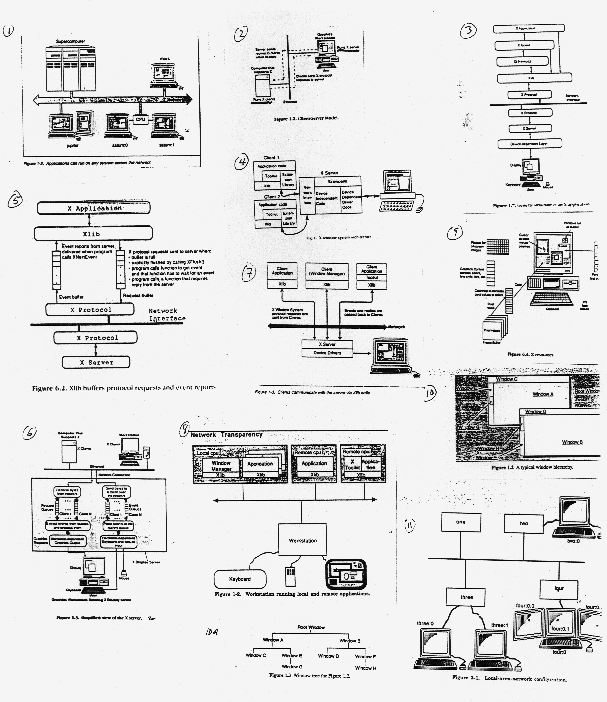
for X Window System Extra Notes
0.
Introduction to GUIs and Windows Programming (Powerpoint, Adobe format,
6 slides/page format)
1.
Using the Visual Studio .NET IDE (Powerpoint, Adobe format, 6
slides/page)
2.
Win32 API Programming (Powerpoint, Adobe format, 6 slides/page)
3.
MFC, App/Windows Programming (Powerpoint, Adobe format, 6 slides/page)
4.
MFC, Document/View Programming (Powerpoint, Adobe format, 6 slides/page)
5.
The .NET Framework: C#, Classes, Windows Forms, Events, Delegates,
Handlers
6.
Timers, Animation, Images, Bitmaps, DateTime
7.
The Mouse and the Keyboard
8.
Windows Controls
9.
Text and Fonts
10.
Dialog Boxes, Text Boxes, List Boxes, Combo Boxes
11.
Menus and Printing
12.
File I/O
13.
Graphics Units, Transformations, and the Clipboard
14.
Multithreading
15.
The Internet: Networking with Sockets
16.
World Wide Web, Web Applications, Web Forms
16A.Web
Applications, Web Forms, Continued
17.
Databases and ADO.NET
18.
ASP.NET Web Services and Web Clients
1.
Using the Visual Studio .NET IDE (Powerpoint, Adobe format, 6
slides/page)
2.
Win32
API Programming (Powerpoint, Adobe format, 6 slides/page)
3.
More Win32 API Stuff -- Mouse, Metrics, WM_PAINT, Text, Fonts (PPT, 6
slides/page)
4.
Menus, NEW!! (PPT/Adobe, 6 slides/page)
5.
Introduction to MFC: App/Window Approach -- NEW!! (PPT/Adobe, 6
slides/page)
-- also see Class 14 Notes below
6.
MFC: Doc/Window Approach, Use of Wizards -- NEW!! (PPT/Adobe, 6
slides/page)
-- also see Class 15 Notes below
7.
Bitmaps, Animation, Timers, DirectX -- NEW!! (PPT/Adobe, 6
slides/page)--
also see Class 4 and Class 4x Notes below
8.
Child Window Controls -- NEW!! (PPT/Adobe, 6 slides/page)-- also see
Class
5 Notes below
9.
More Child Window Controls -- NEW!! (PPT/Adobe, 6 slides/page)-- also
see
Class 5 and Class 8 Notes below
10.
Dialog Boxes -- NEW!! (PPT/Adobe, 6 slides/page)-- also see Class 9 and
Class 15 Notes below
11.
More MFC Dialog Boxes & Controls; Dialog-based Applications, File
I/O
12.
Persistence, Serialization, Drawing, and Printing in the MFC Doc/View
Approach
13. MFC
Timers and Progress Bars; Windows Multimedia
14.
Mapping Modes
15.
The Windows Clipboard
16.
Printing
17.
Network Communication and Web Browsing with MFC
18.
ActiveX: Using Built-in ActiveX Controls
18.
ActiveX: Building and Using Custom ActiveX Controls and Containers
19.
Dynamic Link Libraries: Writing and Using DLLs
19.
Building DLLs and Apps that use them in .NET
Class
0 (old) -- Introduction to GUIs and Windows Programming (Powerpoint,
Adobe
format, 6 slides/page format)
Class
0 (old) -- An Introduction to GUIs and Windows Programming (Detailed
Notes,
Old)
Class
1 (old) -- Using Developer Studio (Powerpoint, Adobe format, 6
slides/page)
Class
1 (old)-- Using Developer Studio 97 (Old)
Week
2 -- Win32 API Programming (Powerpoint, Adobe format, 6 slides/page)
Class
2 -- Windows Win32 API Programming: An Example of Event-Driven,
Graphics-Oriented
Programming (Old)
Class
3 -- Windows Resources, Text and Graphics: Drawing on a Window (Old)
Week
4 -- Menus (PPT/Adobe, 6 slides/page)
Week
5 -- Introduction to MFC: App/Window Approach (PPT/Adobe, 6
slides/page)
-- also see Class 14 Notes below
Week
6 -- MFC: Doc/Window Approach, Use of Wizards (PPT/Adobe, 6
slides/page)
-- also see Class 15 Notes below
Week
7 -- Bitmaps, Animation, Timers, DirectX (PPT/Adobe, 6 slides/page)--
also
see Class 4 and Class 4x Notes below
Week
8--Child Window Controls (PPT/Adobe, 6 slides/page)-- also see Class 4
and Class 5 Notes below
Week
9-- Child Window Controls (Scroll Bars, Edit Controls), PPT/Abobe--also
see Class 4 and Class 5 Notes below
Class
4 -- Windows Bitmaps, Animation, and Timers (Old)
Class
4x --DirectX and Windows Game Programming
Class
5 -- Child Window Controls
Class
6 -- Mouse and Keyboard
Class
7 -- Menus
Class
8 -- Child and Popup Windows
Class
9 -- Dialog Boxes
Class
10 -- Private DCs and Mapping Modes
Class
11 -- Printing
Class
12 -- Memory Management and Files
Class
13 -- The Clipboard
Class
13A -- Dynamic Link Libraries (DLLs)
Class
13B -- More on DLLs
Class
14 -- MFC Windows Programming (The App/Window Approach)
MFC
(App/Window)
Notes from VC++ Workshop
Class
15 -- MFC Windows Programming (The Document/View Approach)
MFC
(Doc/View)
Notes from VC++ Workshop
More
MFC Dialog Boxes and Controls; Dialog-Based Applications (from VC++
Workshop)
MFC
Timers
and Progress Bars; Windows Multimedia (from VC++ Workshop)
MFC
Network Communication; Web Browsing (from VC++ Workshop)
Using
ActiveX Controls -- NEW (Powerpoint, Adobe format, 6 slides/page format)
Creating
an ActiveX Control and Container -- NEW (Powerpoint, Adobe format, 6
slides/page
format)
Persistence,
Serialization, Drawing, and Printing in the MFC Doc/View Approach)
Last
Class -- An Introduction to the X Window System
Figures
for X Window System Class