BestKet - Kaan Demirel, Ufuk Bugday
Introduction
Project Definition
A free throw is a deciding factor in basketball. It can bring you the championship trophy or can send you home early. If your team is surrounded with good shooters, then you might not worry about missing free throws that can cost you the game, but if you have some bad free throw shooters, that can end up changing your whole strategy for the game. With our system, we are aiming to make the players more successful at the free throw line which will prevent the teams from changing their offensive strategies.
Project Plan
Work Breakdown Schedule
WBS will show our project plan with way things are going to work in. With this you can see the evaluation and the phases of work. Every phases will be detailed in our gantt chart. We will show the importance of the levels on other phases
Project Proposal
- With our project, we are aiming to improve the free throw percentage of any player depending on some basic factors.
Field Research
- As far as we know there are no programming project about that but there are some studies about probable best shot formula.
Proposal
- Enhancing %20 of success of any player who had below %50 is our main proposal.
Project Plan
Preparing the Project Plan
- We prepared this project plan document to be able to move forward easily and planned.
Analysis
Assumptions
- -High definition free throw footage is required. (min 720p)
- -The footage should have no other basketballs or players.
- -The following footage angles are necessary:
- -Left (Example Footage)
- -Right
- -Back
- -Left and Right Shooter Close-up
Determining Requirements
- After doing some research, we came up with these factors:
- 1) Before the shot, determine the following distances and angles from the video stream:

- -Left Foot Position(Distance, Angle)
- -Right Foot Position(Distance, Angle)
- -Shooter(Length, Standing Reach)
- -ShootingArmAngle(Ground,UpDown)
- Ground is angle number 2
- UpDown is angle number 1
- -ShootingArmAngle(Ground,UpDown)
- -TheAngleBetweenFootAndLowerLeg
- Angle number 4
- -TheAngleBetweenFootAndLowerLeg
- -TheAngleBetweenLowerAndUpperLeg
- Angle number 3
- -TheAngleBetweenLowerAndUpperLeg
- 2) On release:

- -Ball Position(Distance to Hoop, Release Velocity)
- -Left Foot Position(Distance, Angle, HeelStatus)
- -Right Foot Position(Distance, Angle, HeelStatus)
- -ShootingArmAngle(Ground,UpDown)
- Ground is angle number 2
- UpDown is angle numer 1
- -ShootingArmAngle(Ground,UpDown)
- -TheAngleBetweenFootAndLowerLeg
- Angle number 4
- -TheAngleBetweenFootAndLowerLeg
- -TheAngleBetweenLowerAndUpperLeg
- Angle number 3
- -TheAngleBetweenLowerAndUpperLeg
Design and Programming
UI Design
- For the UI, we are thinking about a simple screen which requests video streams, and returns the suggested factors for the player on the video.

Image Processing Implementation (Collecting Data)
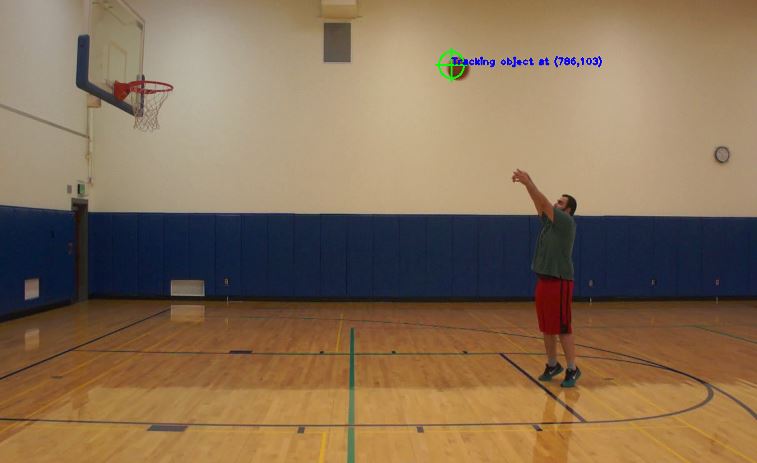
- To collect data, we selected to use OpenCV library.For ball detection, we will use OpenCV's findContours function. After thresholding the image with proper values, findContours can easily identify and track the ball object in real time.For human joints detection and stick figure implementation, we chose to go with Temporal Sequential Forests. The algorithm will gave us the joints for the shooter and then we will calculate the angles and positions.After gathering all the factors using the algorithms above, the factors will be passed to the animation system.
- Ball Tracking
- We tested findContours function, and it gave us good results.

- Human Joints Detection
- 2/14 UPDATE: We switched from Temporal Sequential Forests approach to point tracking using Blender.
- We will implement Temporal Sequential Forests Algorithm for joints detection.
- Animation Creation
- We will create the shot animation using Source Filmmaker or Unity Engine.
Best Shot Formula Implementation
- After gathering all the factors like angles and positions, we will create a simulation based system using our factors and with changing these factors on the animation we will try to find the best factors needed for a perfect shot. We are planning to create the animation using Unity Engine.
Testing
- Will be updated later on.
Testing UI
Testing Image Processing Implementation
Testing the Formula
Maintenance
Estimates


Resources
Software Development Process
We decided to develop our program with using Waterfall Method as a sequential design process because it is easy to understand. Also, to proceed to next part, each part must be completed fully. At the end of each section we have to determine if the project is on the right way.

Schedule
Logs
Week 1&2
- We try to decide what we can do as a senior project. Since we are basketball fan we decided to work on one of the major basketball problem which is improvement of free throw percentage. To do that we outlined the basics of project then we decided that we could handle this via OpenCV with video processing. After we specified waterfall method as a sequential design process. We needed to some data for specifying factors.
Week 3&4
- We went to gym to record some free throw shots. We needed some restrictions to record a clip and these were a camera with at least 720p video quality, no other basketball or player on the background (just one shooter and one ball), stable and tree different angle which are left, right and back. After some records we noticed what factor we should take care of for the calculating best free throw shot. For example distance between player and hoop, shooting elbow angle, .etc.
Week 5&6
- We did some research for image processing algorithms. Searched for the best way to track the basketball. Tried implementing Hough Circles for ball detection but it gave lots of false positives. For the tracking ball we found out "Magnus Effect" and Stoke's Law for the best way for tracking ball. The Magnus Effect is a force that give spin to the ball. It is obvious that player could not decide the magnitude of spin but we are trying to calculate trajectories for the ball. We will do this probably using 2D model rather than 3D model so that we can ignore the 3rd dimension errors. The air resistance is the another factor to considerate. We found out some formula which are driven from Stoke's Law may be useful to formulate the best shot formula.
- Fd = 6πµRv0
- Fd - the frictional force
- µ - dynamic viscosity (can be constant for some particular objects in case we are looking for basketball)
- R - radius of basketball
- v0 - intial calculated velocity
- For future we probably will use this equation to restrict our best shot formula.
Week 7&8
- We chose to go with findContours for the ball detection, because we find out that findContours are much more stable than Hough Circles when it comes to circle detection on an object with a specific color. For stick figure implementation we found two different approaches: Temporal Sequential Forests Approach(implemented only for upper body) and Zheng-Suon Thinning Algorithm(no detection algorithm but eases the way for human joints detection) In spite of deciding which algorithms we are going to use, we worked on our UI design. Decided that our UI will require a screen for users to upload an example free throw shooting video. After processing the video, it will display the factors of the video and the factors that shooter needs for a perfect shot. Users will also have an option to see an example free throw shot animation if they want to. To create the animation we are thinking about using Unity Engine. We are still researching for other animation creating options.
Week 9&10
- For joints detection, we decided using Temporal Sequential Forests because of its effectiveness. To find the best shot formula, we decided to calculate best factors with a simulation ( or animation ) that is going to be created using Unity Engine. We decided to design our UI with C# and created an example UI design as shown under the UI Design title of this document. Our image processing algorithms will use OpenCV and C++. To make the UI and Image Processing Algorithms run together, we searched for a way to use OpenCV on a C# Application. After asking about the issue on StackOverflow, we came up with EmguCV which allows you to use OpenCV functions in a C# Application. We did some more digging and found out that EmguCV is going to over-complicate things and what we actually need is to run the .cpp files on a C# Application. We found the following options for running a CPP file in a C# Application: Using C#'s Process Class or Compiling the CPP to a DLL. We chose to go with the DLL approach.
Week 11&12&13
- We prepared a Gantt Chart for the project. In our chart, we degraded the tasks into small parts to be able to track the processes easily. To collect better data, we e-mailed some NBA team owners and coaches, and asked them for footage while their players shooting free throws.
- Kaan Demirel <kdemire1@binghamton.edu>
- 11:11 PM (10 days ago)
- To sballmer@clippers.com
- Hello Steve,
- I am a Senior Computer Science Student at Binghamton University and Istanbul Technical University. Also, a big fan of the Clippers. I am currently on a project to increase free throw percentages of players who are accepted as 'hackable' like DeAndre, Drummond, Josh Smith etc. To do so, I need some footages while DeAndre or Josh shooting free throws. I would appreciate if you could direct me to someone that can help me with the situation. Thank you very much, and thank you again for being a great owner.
- Best,
- Kaan Demirel
- We started implementing image processing algorithms. Played a little with findContours function for tracking the basketball. The function gave us enough results to be able to draw a path for the basketball from shooter's hand to the basket. On some footages, we lost the ball when there is a high arcing shot that makes the ball go out of the frame. Ball should always be in the frame to be able to track its path to the basket.
