Due Date: 2-18-2010
Only CS-560 students are required to do Part D
PART A.
In the first part of this assignment you are to write a Windows Visual C++
(MFC) program that will display a horizontal colored strip across the client
area of the program's window. The strip should consist of 256 vertical
colored lines about 200 pixels high. Each line in the strip should be of a
different intensity and color. The colors are to be determined by user
selection from a popup menu consisting of the following eight items: "red",
"blue", "green", "magenta", "cyan", "yellow", "gray", "random". For each of
the first seven menu selections, the leftmost line in the strip should be
of zero intensity and the rightmost line of maximum intensity (255). "Red"
should have no blue or green mixed in, "blue" should have no red or green
mixed in, "green" should have no red or blue mixed in, each "magenta" line
should have equal intensities of red and blue with no green, each "cyan"
line should have equal intensities of green and blue with no red, each
"yellow" line should have equal intensities of red and green with no blue,
and each "gray" line should have equal intensities of red, green and blue.
The r,g,b intensities of each "random" line should be chosen from 0 to 255
at random. (Hint: check out the stdlib's rand() function.)
To plot the lines you should use the GDI function SetPixel(), or MoveTo()
in conjunction with LineTo(). These are members of the CDC class. In either
case the macro RGB() should be used to set the color of the pixel or of the
line's pen. Try to run the program on a system in which the display mode
has been set to 24-bit direct color ("true color"), then to 16-bit direct
color ("high color"), and finally to 256 indirect color mode. Note the
differences. [You can change the display mode by right clicking on the Windows
desktop, then on "Properties"; in the "Display Properties" dialog box, choose
the "Settings" tab and select the desired "Color quality". To get into 256
Indirect Color mode you may have to right click on the executable (in Windows
Explorer), then click "Properties"; click on the "Compatibility" tab, and select
the "Run in 256 colors" check box. Subsequently when you run the program it will
run in 256 Indirect Color mode. Note that the screen will revert to your
default color quality when you close the program.]
Part B.
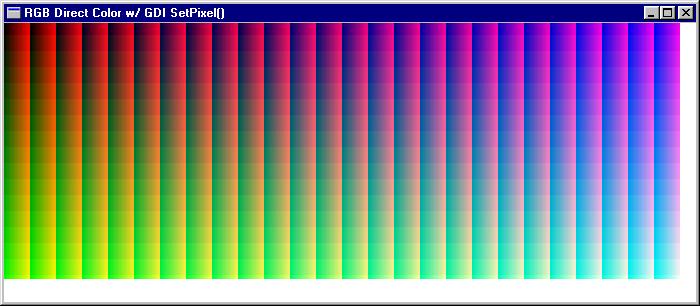
In this part of the assignment you are to write a Windows MFC program that
displays a true-color pattern of colored dots in which all 256 shades
possible shades of green, 26 continuously-varying shades of blue, and 26
continuously-varying shades of red are shown. the pattern should be laid
out as follows: There should be 26 256-pixel high columns, each of which is
26 pixels wide. As you move down each column the intensity of green should
vary from 0 to 255. In the leftmost column all dots should have 0 blue
intensity; in the next column to the right, the blue intensity should be
10, ..., and in the rightmost column the blue intensity should be 250.
Within each column the leftmost pixel should have a red intensity of 0, the
next pixel to the right a red intensity of 10, ... and the righmost pixel in
the column a red intensity of 250. The pattern should appear something like
the following:
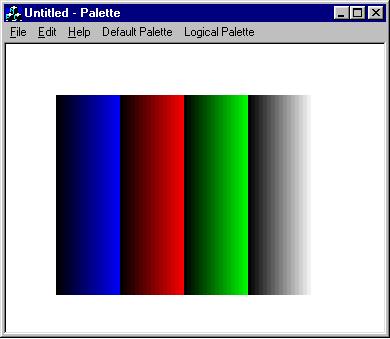
PART C. In this part of the assignment you are to write a Windows program that displays 256 vertical colored lines using Windows indirect color and logical palettes (CLUTs). Two displays should be shown, perhaps in response to menu items or the user pressing two different keys from the keyboard. In the first one the default system palette should be used. In the second you should create a logical palette that can be used to produce four groups of 64 continuously-varying shades of red, green, blue, and gray vertical lines. The first group should be in continuously-varying shades of pure blue, the second in continuously-varying shades of red, the third in green, and the last in gray. In each group the left-most line should be of 0 intensity and the right-most one at maximum intensity (255), or close to it. This palette should be selected into the display device context and "realized" so that it is mapped to the system palette. The program should then redreaw the lines. For both displays, you should use the macro PALETTEINDEX() to set the color of the pixels (or pen) to each of the colors in the 256-color system palette. You should now notice, that even though the display has been set to 256-color mode, the colors you get are "correct." In other words, you now get all 256 colors. The patterns observed should look something like the following:

To set up the logical palette, you will need to make a call to CreatePalette() after having set up a "logicalPalette" structure. You could use LOGPALETTE (defined in windows.h), but it is probably better to use your own structure (see below) so you don't have to allocate memory.
struct { WORD Version; WORD NumEntries; PALETTEENTRY pEntries[256]; } logicalPalette;
Here PALETTEENTRY is defined as:
typedef struct tagPALETTEENTRY { BYTE peRed; BYTE peGreen; BYTE peBlue; BYTE peFlags; } PALETTEENTRY;
To create the logical palette you should set the first member of your logicalPalette structure to 0x300 (meaning for Versions of Windows later than v3.0), the second to 256 (since you are going to change all 256 CLUT entries), and the elements of the pEntries array to appropriate values of red, green, and blue. It is suggested that you set the peFlags members to 0.