CS-360/580H, Assignment 6
CS-360 Due Date: 11-16-09
CS-580H Due Date: 11-17-09
In this assignment you are to enhance the Visual Studio .NET
C#
sandwich shop application you created in your
last assignment. You are to add a main menu with a "File" menu item
that contains a submenu with the items "Print",
"Open", and "Save". The "Print" menu should itself have a submenu with
the items "Print Preview" and "Print".
When the user clicks on the on the "Print" menu item, the list of
sandwiches
and prices should be printed out on the
system's default printer. Clicking on the "Print Preview" menu item
should cause the Microsoft "print preview
common dialog box" to start in order to allow the user to see how the
printed output of the two lists will look when
the document is printed. The printed output should look something like
the following:
Richard Eckert's Sandwich Shop
Hamburger
$2.25
Hot
Dog
$1.50
Sausage Sandwich $3.00
Chicken Spiedie $3.50
Italian Sub $3.25
(Your sandwich shop's name, sandwich types, and sandwich prices should
appear instead of mine.)
If the user clicks the "Open" menu item, the Microsoft "open file
common
dialog box" should appear and permit the
user to either type in or browse the computer's directory structure
and select a file. The file entered or selected by the
user should then be opened, and its contents should populate the
sandwich
types combo box and the list of prices
maintained by your program. If the user clicks on the "Save" menu item,
either a Microsoft "save file common dialog
box" or an "open file common dialog box" should open to once again
allow the user to type in or select a file name to
which the current lists of sandwiches and prices should be saved.
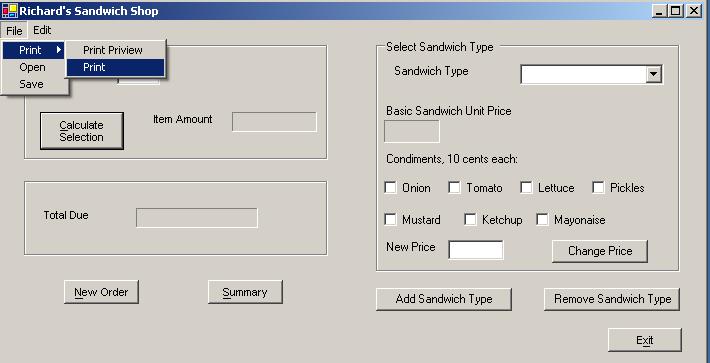
The following is a screen shot of what should happen when the user
clicks
on the "File/Print" menu item:
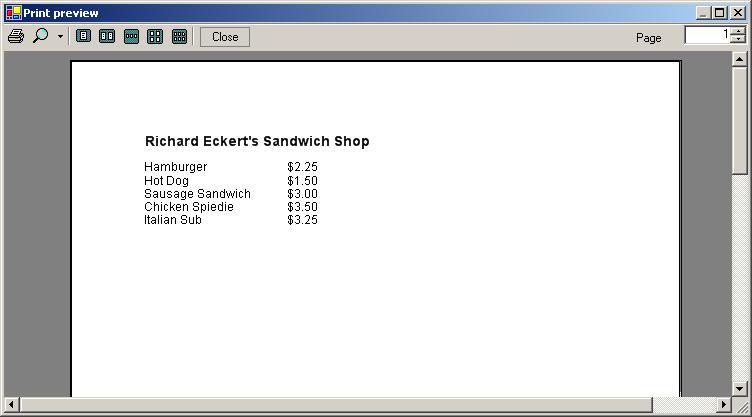
The following is a screen shot showing what the print preview common
dialog box should look like when
"File/Print/Print Preview" is selected from the menu:
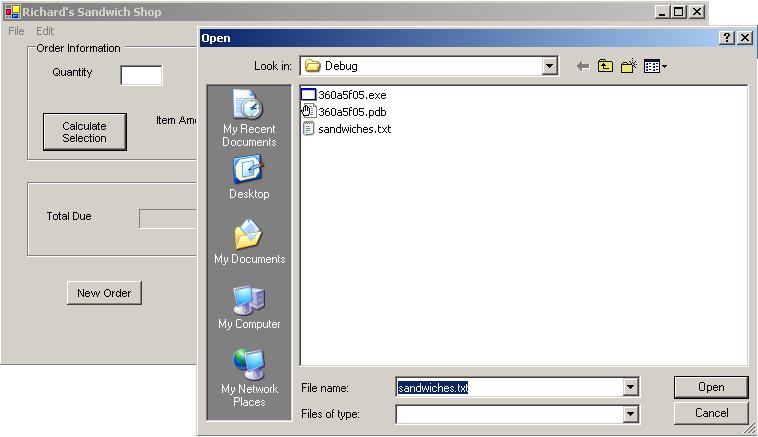
The following is a screen shot of what should appear when "File/Open"
is selected from the memu:
You should also add an Edit main menu item that, when selected, brings
down a submenu with the items "Add
Sandwich Type" and "Remove Sandwich Type". When either of these is
selected, the same actions should occur as
when the user clicks the corresponding buttons on the main window form.
<>
Finally you should add a "splash screen" that will appear for several
seconds when the user first runs the application, before the
main form comes up. This should contain text and one or more picture
boxes containing images that "advertise" the sandwich
shop. You can get images from the internet and incorporate them
into picture boxes on the splash screen form, as
explained in class.
For extra credit, include menu items (not shown above)
that allow the user to print, preview, or save the current order and to
retrieve a previously-saved order from a file by specifying the name of
the
file (with an open file common dialog box) that
contains the order's information. An order consists of the quantities
and
types of sandwiches ordered as well as the total price,
including, of course, any extra cost for condiments.