CS-360/580H, Assignment 5
CS-360 Due Date: 11-9-2009
CS-580H Due Date: 11/10/2009
In this assignment you are to prepare a Visual Studio C# .NET
application
that will enable the user to take
orders, change prices, add/remove products, and compute and summarize
the amount owed in orders taken
in a small business such as a sandwich shop.
The user should be able to select a sandwich type from a "Sandwich
Type"
dropdown combo box that
includes the initial items: "Hamburger", "Hot Dog", "Sausage Sandwich",
"Chicken Spiedie", "Italian Sub".
Each of these types has an initial unit price of: $2.25, $1.50, $3.00,
$3.50, $3.25, respectively Each time
a new sandwich type is selected the price should appear in a "Basic
Sandwich Unit Price" label control.
Underneath this control there should be a list of condiments (check
boxes) that can be included with each
sandwich: Onion, Tomato, Lettuce, Pickles, each of which, when
selected,
will add 10 cents to the price of
the sandwich. Check boxes for the kinds of spreads desired (mustard,
ketchup, mayonaise) should be
available as well. Finally there should be a "Change Price" button
which, when clicked, changes the price of
the currently-selected sandwich type to that entered by the user in
a "New Price" text box. All of the
above-mentioned controls should be contained in a "Select Sandwich
Type" group box.
There should also be an "Order Information" group box that contains
a "Quantity" text box, a "Calculate
Selection" button, and an "Item Amount" label control. The user may
enter a number in the "Quantity" text
box to indicate how many sandwiches of the currently-selected sandwich
type he/she wants to order.
Clicking the "Calculate Selection" button will add that item to the
purchase and cause the price of that
number of sandwiches of the selected sandwich type (including the
additional
cost of the condiments chosen)
to be displayed in the "Item Amount" label control. In addition,
outside
the "Order Information" group box
there should be a "Total Due" label control that is updated to display
a running total of the total price of that
order every time a new item is added to it.
Underneath the "Order Information" group box there should be two
buttons.
One should be a "New Order"
button which allows the user to begin to order a new set of items.
The second button should be a "Summary"
button which, when clicked, will display a message box giving the total
number of orders placed to date, the
total sales value of all the orders, and the average sale value of
those orders.
Underneath the "Select Sandwich Type" group box there should be two
buttons: "Add Sandwich Type" and
"Remove Sandwich Type". The first of those buttons should cause a modal
dialog box to displayed which will
allow the user to add a new sandwich type and its unit price to the
sandwiches sold by the store. The second
should cause the currently-selected sandwich type to be deleted from
the types of sandwiches sold by the
store. Finally there should be an "Exit" button that, when clicked,
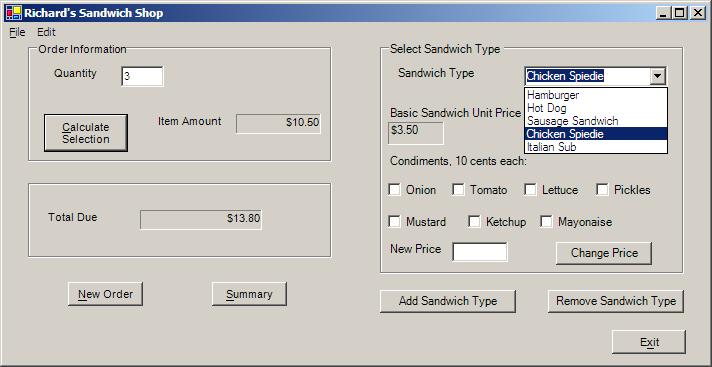
closes the application. The following figure
shows the kind of window that should be visible as the application
is executing.
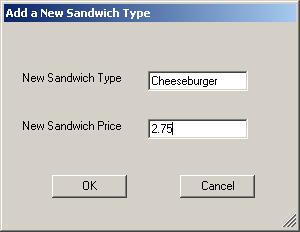
The figure below shows what the dialog box that appears when the "Add
Sandwich Type" button is clicked
should look like:
<>Some hints:
The combo box that is used to hold the sandwich types is itself an
adequate
data structure to store, add to, and
remove sandwich types. However you will also need an additional dynamic
data structure to store their prices.
My suggestion is to use an ArrayList that is parallel to the combo
box's Items property list. The ArrayList that
I used stored values of type decimal -- which means that any time you
assign a literal value to any variable or
other data structure, you must use the "M" suffix on the literal (e.g.,
1.50M). Any time a new sandwich type is
added to or removed from the combo box, your code should add or remove
the corresponding decimal price to
or from the ArrayList.
The dialog box that is invoked whenever the user wants to add a new
sandwich type and price will, of course,
be encapsulated in a separate class derived from Form. That dialog
box should be invoked modally, and the
input provided by the user should only be used if the user clicks the
OK button; nothing should happen if he/she
clicks the Cancel button. Any values that are to be retrieved by the
parent form should be available as public
properties of that dialog box's class.
You will need class level variables to keep track of the total amount
due for a given order as different quantities
of different sandwich types are selected by the user and to keep track
of the total number of orders placed to
date and the total sales value of those orders.
Any time any dollar amount is displayed in a text box or any other
control
it should be formatted approriately.
You could use the variable's ToString("C") member method to do that
formatting.
Ideally your program should have try/catch exception blocks that put
up error message boxes whenever invalid
data is input by the user. However, please leave that for last. It
is more important to get all the desired
functionality first.