Assignment 2
Due Date: 10-1-09
In this assignment you are to use Microsoft Visual Studio 2005 or 2008 to
develop a Visual C++, MFC, Document/View, Single Document Interface Windows
application that performs most of the same functions as your first Win32 API
assignment. In addition, an extra "Rubberband Line" function will be added
and a couple of modal dialog boxes will replace the standalone controls and
one of the menu items. These are described below.
As in the first assignment there is to be a menu with the items: "Drawing
Function", "Pattern", "Size", "Orientation", "Color", "Text", "Clear", and
"Quit". All but the last four should be popup menus. When the user clicks
"Drawing Function", a popup menu with the items: "Ellipse", "Sketch",
"Polygon", and "Rubberband Line", should appear. All but the last of
these should work just as they did in your first assgnment. The sketching
should be done in exactly the same way illustrated by the "Sketch" example
MFC program discussed in class. If the user selects "Rubberband Line", a
subsequent press of the left mouse button should anchor one end of the line
to be drawn. While the left mouse button remains down, the user should be
able to move the mouse so that a line is continuously drawn from the anchor
point that stretches and contracts in such a way that the other end of the
line follows the motion of the mouse. This can be achieved if each time the
mouse moves (with the left button still down), the old line is erased (by
perhaps drawing it again with a background-colored pen) and then drawing a
new line from the anchor point to the point at which the mouse cursor was
when the mouse moved. The line should be made "permanent" when the left
mouse button goes up. As for sketching, the thickness of the rubberband line
should be determined by the current "Size" menu item selection, just as in
Assignment 1.
The "Pattern", "Size", "Orientation", "Clear" and "Quit" menu items should work
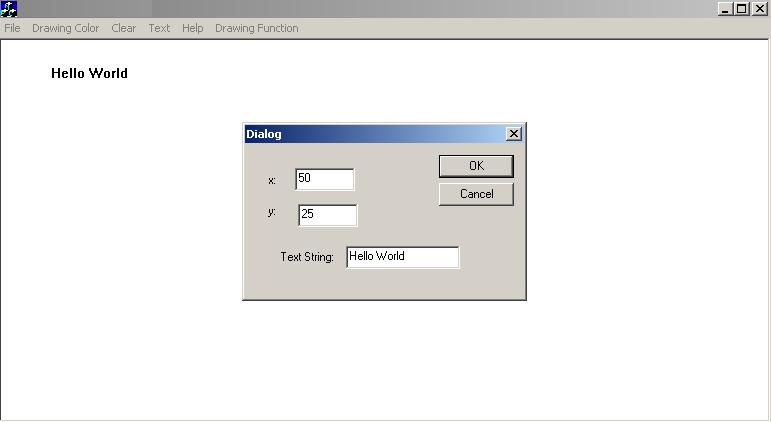
the same way as in Assignment 1. The "Text" menu item should now cause a modal
dialog box entitled "Text Entry Dialog Box", similar to the one shown below, to
appear. (In the figure below the title of the dialog box is "Dialog" instead of
"Text Entry Dialog Box".) This dialog box should contain edit controls in which
the user can type the text he/she desires to be displayed as well as the (x,y)
coordinates of the point on the parent window's client area where the text should
appear. After the user clicks the "OK" button inside this dialog box to dismiss
it, the text the user entered should appear on the parent window's client area
such that the upper lefthand corner of its imaginary bounding rectangle is at the
(x,y) coordinates entered by the user. If the user clicked the dialog box's
"Cancel" button, nothing should be displayed after the dialog box disappears.
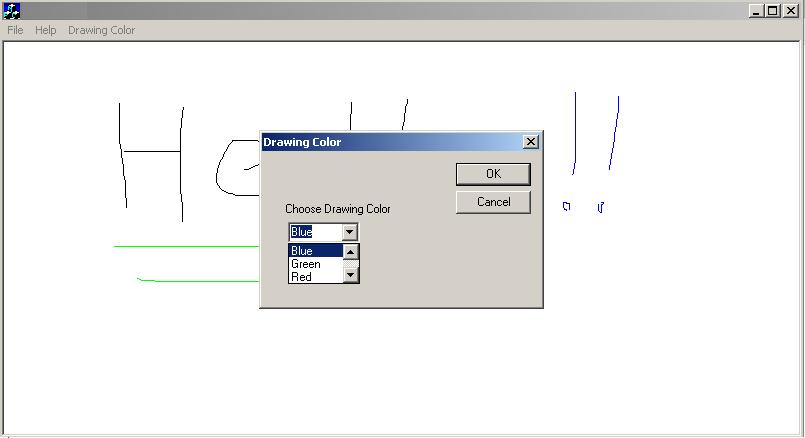
The "Color" menu item should now not be a popup menu. Instead, when the user selects it,
another modal dialog box entitled "Drawing Color" similar to the one shown below
should appear. This dialog box should contain a dropdown combo box that contains all the
available drawing colors to appear (see the figure below). Whenever the user clicks the
"OK" button inside that dialog box to dismiss it, the drawing color should change to the
one the user selected from the combo box. No change in drawing color should occur if the
user clicked the "Cancel" button to dismiss the dialog box.
As for Assignment 1, your window should have an appropriate title.
Use the "Sketch" example program discussed in class as a model for developing this
MFC Document/View application.
YOU ARE TO TURN IN A CD-ROM that contains a copy of the entire project's
directory (with all the large, unnecessary temporary files deleted). Finally,
submit with the CD a printed listing of the file containing your view class
implementation (e.g., SketchView.cpp -- the name will not necessarily be the
same as given here). The CD and program listing should be put in an envelope
with your name, CS-580H, and the assignment number (2), as in Assignment 1.