Assignment # 4
CS-360 Extended Due Date: 11/2/2009
CS-580H Extended Due Date: 11/3/2009
In this assignment make a "real game" out of the "pinball" game you began in
the last assignment. Try to make the game as "fancy" as possible. (I suggest
you go to pinball game web sites such as www.thepinballzone.net to get ideas.)
Regardless of what you decide to do, you are to include ALL of the following
features (Please see the figure below to visualize what the minimum
requirements are):
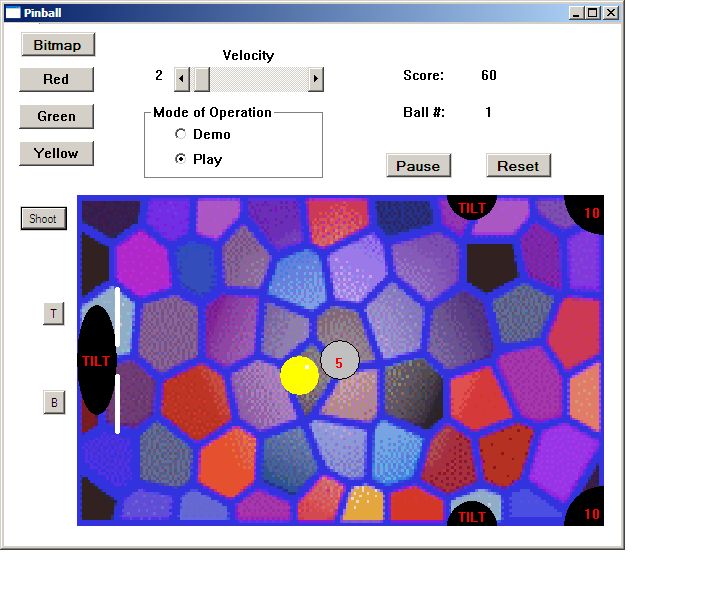 Make the playing area a rectangle in the window form's client area. The playing
area should be some sort of a background image suggesting a real pinball game
(design your own with a Paint program or download an image from the internet.
Leave space at the top of the form's client area for an information/input
region consisting of: push buttons the user can press to give the ball any
several different colors, including an option to have a fancy predefined bitmap
or image to represent the ball (again design your own or download an image); at
least one standalone scroll bar with which the user can change the velocity of
the ball and flippers; a label control that shows the current ball velocity;
two other label controls that continually show the number of points scored in
the current game and the ball number the player is on as the game progresses;
a group box called "Mode of operation" containing two radio buttons labeled
"Demo" and "Play".
The game should run in either of two mutually exclusive modes, depending upon
which radio button is active. In "Play" mode the user will be able to click on
a "Shoot" button to the left of the top left end of the playing area. That
action (or pressing the "S" key on the keyboard) should send out the next ball
with a velocity that is both random in magnitude and direction. There should
now be two flippers positioned just inside the left end of the
playing area. Next to them, outside the playing area there are to be two buttons
(labeled T and B), each of which causes one of the flippers to move. If the T
button is clicked by the user (or if the T key on the keyboard is pressed), the
top flipper should move; the B button (or B key) should cause the bottom flipper
to move. In either case the movement is to be as follows: The lower flipper
will move for one cycle as in Assignment 3 (one cycle: pivoting about its lower
end from the vertical position down to the horizontal position and springing
back up again); the upper flipper will pivot about its upper end from a vertical
down position up to the horizontal position and then spring back down (see
diagram). In demo mode the behavior will be similar to that of the last
assignment (with both flippers moving continually in syncronization). The game
should start in demo mode.
In addition to the target in the lower right corner of the playing field, there
should be several others in different areas of the field. Each should be labeled
with a number indicating how many points are scored if the ball hits that
particular target. Several of these targets should should be fancy images that
"light up" in different and interesting ways when struck by the ball. A "Score"
label control should show the current total score at all times. Behind the
flippers, as well as at several other places on the playing field, there should be
black "TILT holes" where the ball will "disappear" if it comes close enough to
them. Any time that happens the action should stop until the user "Shoots" the
next ball - unless a certain maximum number of balls has been exceeded. A
"Ball #" label control should display the number of the ball that was just shot
(the current ball number) at all times. If the ball that just disappeared was the
last one, the game should end, and a "YesNo" message box should appear asking the
user if he/she wants to play another game. A "yes" response will start a new
game; "no" will terminate execution of the program after giving a report (in a
message box) of what was the highest score recorded for all games played during
the program run.
There should be a "Pause" button to temporarily stop the game, thereby allowing
the user to temporarily pause the motion until he/she clicks the same button
again. Whenever this happens the button should be relabeled "Restart"; when it
is clicked again to resume the action, the label should change back to "Pause".
There should also be a "Reset" button to start a new game (setting both the
score and the ball number to zero).
In this version of the program, anytime a new frame is drawn you should use the
"double buffering" technique described in class to reduce flicker. In other
words, all drawing should be done to an off-screen image or bitmap, and when
this is finished, it should be transferred to the screen only once. Also, as
mentioned above, you should include a bitmap that will form the background over
which the game is played. As the ball and flippers move, uncovered areas of the
background should always be visible. There should be no "rectangular halos"
around any moving objects.
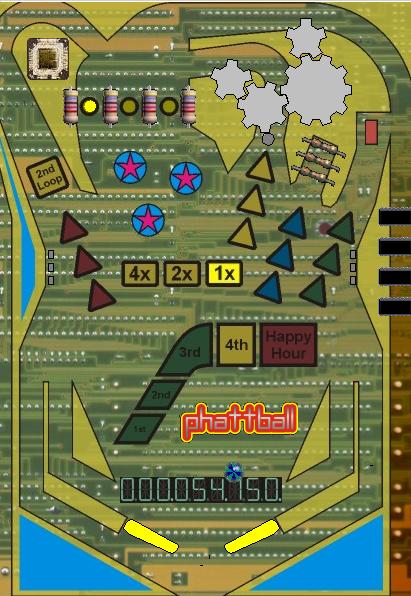
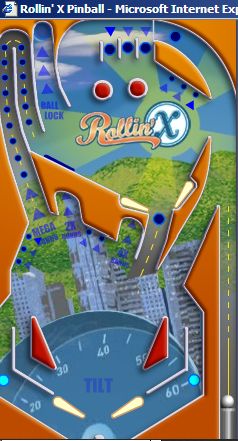
Extra Credit: (1) Make each flipper be some sort of an image that moves after
each frame of the animation. This could be done by generating a sequence of
flipper images, one for each new flipper position, and displaying them one after
another, in succession, after each flipper timer tick event. (2) Draw other
moving objects on the playing field; for example, there might be some gears that
move around and if the ball hits them its motion would be changed; or maybe
other sets of continuously-moving flippers at different locations on the playing
field (see figures below - and others - from other online Pinball games for some
ideas). These moving objects might be controlled by separate timers.
If you wish, you may orient your pinball game vertically (as in the figures
below) instead of horizontally.
Make the playing area a rectangle in the window form's client area. The playing
area should be some sort of a background image suggesting a real pinball game
(design your own with a Paint program or download an image from the internet.
Leave space at the top of the form's client area for an information/input
region consisting of: push buttons the user can press to give the ball any
several different colors, including an option to have a fancy predefined bitmap
or image to represent the ball (again design your own or download an image); at
least one standalone scroll bar with which the user can change the velocity of
the ball and flippers; a label control that shows the current ball velocity;
two other label controls that continually show the number of points scored in
the current game and the ball number the player is on as the game progresses;
a group box called "Mode of operation" containing two radio buttons labeled
"Demo" and "Play".
The game should run in either of two mutually exclusive modes, depending upon
which radio button is active. In "Play" mode the user will be able to click on
a "Shoot" button to the left of the top left end of the playing area. That
action (or pressing the "S" key on the keyboard) should send out the next ball
with a velocity that is both random in magnitude and direction. There should
now be two flippers positioned just inside the left end of the
playing area. Next to them, outside the playing area there are to be two buttons
(labeled T and B), each of which causes one of the flippers to move. If the T
button is clicked by the user (or if the T key on the keyboard is pressed), the
top flipper should move; the B button (or B key) should cause the bottom flipper
to move. In either case the movement is to be as follows: The lower flipper
will move for one cycle as in Assignment 3 (one cycle: pivoting about its lower
end from the vertical position down to the horizontal position and springing
back up again); the upper flipper will pivot about its upper end from a vertical
down position up to the horizontal position and then spring back down (see
diagram). In demo mode the behavior will be similar to that of the last
assignment (with both flippers moving continually in syncronization). The game
should start in demo mode.
In addition to the target in the lower right corner of the playing field, there
should be several others in different areas of the field. Each should be labeled
with a number indicating how many points are scored if the ball hits that
particular target. Several of these targets should should be fancy images that
"light up" in different and interesting ways when struck by the ball. A "Score"
label control should show the current total score at all times. Behind the
flippers, as well as at several other places on the playing field, there should be
black "TILT holes" where the ball will "disappear" if it comes close enough to
them. Any time that happens the action should stop until the user "Shoots" the
next ball - unless a certain maximum number of balls has been exceeded. A
"Ball #" label control should display the number of the ball that was just shot
(the current ball number) at all times. If the ball that just disappeared was the
last one, the game should end, and a "YesNo" message box should appear asking the
user if he/she wants to play another game. A "yes" response will start a new
game; "no" will terminate execution of the program after giving a report (in a
message box) of what was the highest score recorded for all games played during
the program run.
There should be a "Pause" button to temporarily stop the game, thereby allowing
the user to temporarily pause the motion until he/she clicks the same button
again. Whenever this happens the button should be relabeled "Restart"; when it
is clicked again to resume the action, the label should change back to "Pause".
There should also be a "Reset" button to start a new game (setting both the
score and the ball number to zero).
In this version of the program, anytime a new frame is drawn you should use the
"double buffering" technique described in class to reduce flicker. In other
words, all drawing should be done to an off-screen image or bitmap, and when
this is finished, it should be transferred to the screen only once. Also, as
mentioned above, you should include a bitmap that will form the background over
which the game is played. As the ball and flippers move, uncovered areas of the
background should always be visible. There should be no "rectangular halos"
around any moving objects.
Extra Credit: (1) Make each flipper be some sort of an image that moves after
each frame of the animation. This could be done by generating a sequence of
flipper images, one for each new flipper position, and displaying them one after
another, in succession, after each flipper timer tick event. (2) Draw other
moving objects on the playing field; for example, there might be some gears that
move around and if the ball hits them its motion would be changed; or maybe
other sets of continuously-moving flippers at different locations on the playing
field (see figures below - and others - from other online Pinball games for some
ideas). These moving objects might be controlled by separate timers.
If you wish, you may orient your pinball game vertically (as in the figures
below) instead of horizontally.