Assignment # 3
Due Date, CS-360: 10-16-09
Due Date, CS-580H: 10-15-09
This assignment will be the first step in building an interactive "Pin
Ball Machine" game for Windows using C# in a .NET Windows Forms application.
You are to modify the bouncing ball program discussed in class so that
the client area of the windows form becomes a simple pinball machine
playing surface. For this assignment the user doesn't play; instead
he/she watches a simple "demo game" that plays automatically until the
user closes the form.
At the left end of the client area there should be a solid blue
"flipper" that continually pivots in small steps from the vertical
position down to the horizontal position. At the other end of the client
area in one of its corners there should be a green circular "post" that
is the target. The ball is in motion as in the bouncing ball demo, but
each time it hits the target post, the program should beep and the color
of the post should change (reminiscent of the target post lighting up
when struck in a real pinball game). The ball should then rebound with
the same velocity in the opposite direction from what it had just prior
to impact. (This is not physically correct. For up to 5 extra points,
write your program so that when the ball hits the target, the rebound
angle is equal to the incident angel.)
Each time the target post is struck, the program should add another point
to a running score it is keeping track of.
Any time the ball hits the flipper, it should rebound with a velocity
whose direction is the same as the direction the flipper was moving at
the time of impact. For example, if the flipper was in the vertical
position, starting to move forward, its motion is in the x direction, and
the velocity acquired by the ball will also be in the x direction, with no
y component.
When the user terminates the application by clicking the close button (x)
on the Form's title bar (thereby triggering a form "Closing" event), an "OK"
message box showing the score (number of points scored) should appear.
Clicking "OK" in that message box will then exit the program.
The game should also continue with the flipper and target post in their
same relative positions on the playing surface if the window is resized by
the user.
Some hints:
A timer should be used to trigger each new frame of the annimation.
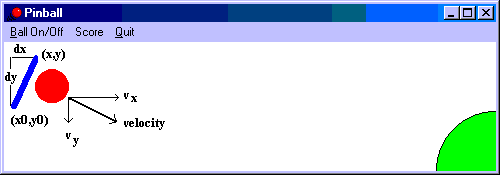
You can implement the flipper as a wide straight line. One endpoint will
have fixed coordinates (i.e., x0,y0). The other end begins at (x0,y0-L),
where L is the length of the line, and with each timer "Tick" event,
the position of this moving endpoint changes. In general its coordinates
will be (x,y). The correct way to simulate the motion of the flipper is
to use polar coordinates and trigonometry to get the new coordinates of
the moving endpoint. This should continue until the line is nearly horizontal
(i.e., y = y0), at which time the moving endpoint should be returned to
its initial position. This motion will continue as long as the game is in
progress.
As far as getting the rebound velocity of the ball off the flipper, the
easiest (and almost correct) thing to do is just to assign to its x
component, vx, a value proportional to the y displacement (dy = y0-y) of
the moving endpoint, and to its y component, vy, a value proportional to
the endpoint's x displacement (dx = x-x0). Thus, for example, if the flipper
is in its initial vertical position (x = x0), the x displacement is 0
[x0-x0 = 0], so the y velocity component would be 0. And since y = y0-L,
the y displacement dy is L [y0 - (y0-L) = L], the maximum value, we would
assign the x velocity component a maximum value--perhaps the constant
VELOCITY used in the bouncing ball demo program. So the ball would rebound
in the horizontal direction as it should in that configuration. See the
figure below for an illustration of a more general case. (For Assignment 3
you don't have to have a menu bar with menu items shown in the figure.)
Another problem you will have is to determine when the flipper strikes the
ball. As a first approach you can make a simple test comparing the ball's
coordinates [(xC,yC) in the demo] with the current endpoint coordinates of
the flipper [(x0,y0) and (x,y)]. You will see, however, that when you do
this, there will be an obvious gap if the ball is arriving somewhere near
the center of the flipper. A more precise method would be to use the formula
for the distance d between a point Q and a line directed along vector u
containing point P. The formula is:
| PQ X u |
d = -------------
| u |
Here the X means the vector cross product; the components of vector u can
be obtained from the endpoints of the line [(x0,y0) to (x,y)], and the
components of PQ from the fixed endpoint of the line (x0,y0) and the
current position of center of the ball (xC,yC). Once your program has
computed the distance, you can compare it with the radius of the ball to
see if it is close enough to be struck.
The target post can be drawn as 1/4 of a filled (solid green) circle in the
lower right hand corner of the client area. In the example demonstrated in
class, the radius of the circle was 3 times the radius of the ball. From the
coordinates of the center of the ball and the coordinates of the center of
the target circle, the distance between the two centers can be computed.
Using the result of that computation and the values of the radius of each
circle, you can determine if and when the ball strikes the target. In the
demo, when the target is struck, three concentric solid circles of magenta,
cyan, and yellow are drawn to give the "lighting" effect that accompanies
the beep.
You will probably need to use some static methods from the Math class.
Some useful ones are: Math.Sin(...), Math.Cos(...), Math.Pow(...),
Math.Sqrt(...), Math.Abs(...), Math.Min(...), Math.Max(...). There is also
Math.PI which gives the value of pi. Since the trig functions take angles
in radians, you could use the value of pi to convert from degrees to
radians. In addition the static Beep(...) method of the Console class
can be used to make a beep sound. Look at the online help to see how to
use these methods.
This assignment is to be done using the Microsoft .NET Framework. Use
Visual Studio 2005/2008 as the development environment and C# as the
programming language. You may submit a CD or flash drive containing the
entire solution directory (with the large temporary files removed) and a
printout of all of the .cs source files or, alternatively, zip the project
directory and email it to cs360assmts@gmail.com or cs580assmts@gmail.com.
Be sure to put the CD/flash drive and the lisings in some sort of an envelope
with your name, course number, and assignment number (3) written on the
outside.